Hey Guys,
Lots of guys asked me
"How to make hotspot in your windows laptop without using any SOFTWARE"
NOTE: Using CMD(Command Prompt) Only
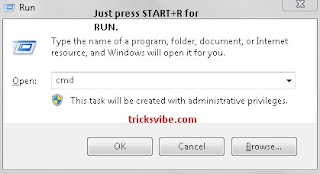
1. Open CMD
a. by pressing START+R and type cmd in it.
b. just type cmd in start search bar(for windows 7+)
2. Now just type the following commands in it:
# netsh wlan set hostednetwork mode=allow ssid=tricksvibe key=password
# netsh wlan start hostednetwork

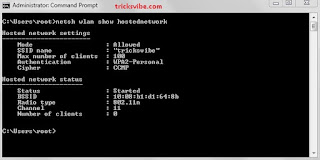
3. To check the status of hotspot:
# netsh wlan show hostednetwork
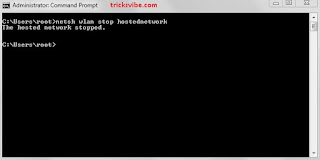
4. To stop hotspot:
# netsh wlan stop hostednetwork
Or if you are lazy like me then just download the scripts written by me and double click on them :p
StartScript
ShowStatusScript
StopScript
So this was my little post for
how to make hotspot in windows without using any software (only using cmd).
Like us
Subscribe us
If u liked what we did.
Thanx for watching and hope it helped.
Lots of guys asked me
"How to make hotspot in your windows laptop without using any SOFTWARE"
NOTE: Using CMD(Command Prompt) Only
1. Open CMD
a. by pressing START+R and type cmd in it.
b. just type cmd in start search bar(for windows 7+)

2. Now just type the following commands in it:
# netsh wlan set hostednetwork mode=allow ssid=tricksvibe key=password
# netsh wlan start hostednetwork

3. To check the status of hotspot:
# netsh wlan show hostednetwork

4. To stop hotspot:
# netsh wlan stop hostednetwork

Or if you are lazy like me then just download the scripts written by me and double click on them :p
StartScript
ShowStatusScript
StopScript
So this was my little post for
how to make hotspot in windows without using any software (only using cmd).
Like us
Subscribe us
If u liked what we did.
Thanx for watching and hope it helped.


