Showing posts with label tips. Show all posts

Wednesday, March 09, 2016

HOW TO RUN HIGH GRAPHICS GAME WITHOUT GRAPHICS CARD INSTALLED


Graphic card plays a important role in PC performance & Gaming environment. Well for the outmost gaming experience its recommended to go with the best graphic card option else you might face errors.
Well if you are a gaming freak then you might have noticed that few games actually do not need a graphic card to be installed but they can be played pretty well without installing any graphic card, so today I will be showing you how you can easily play all those games without any graphic card installed.
So we are going to use 3D-Analyzer, well you also heard about the swiftshader files that worked great, but now that method is too old and we have this amazing tool that can be used as the best graphic card emulator.

How It works...

So basically this tool simply utilizes your RAM as a graphic card memory, so suppose you have 2 GB installed as your RAM then it will access near about 256 MB as the graphic card memory and then keep rest as the normal RAM.

So this is a way that simply fakes the system in having a nice graphic card but its still running on single RAM. So now follow below steps on how this tool really works.
1. Download 3D-Analyzer Tool for Windows.
2. Now it's a .zip package so make sure to extract the package to get .exe file.
3.So now as you will open this tool you will see a big Select button, simply press that too choose your game file.

4. So make sure to navigate to the original game directory and select the .exe file of your game you wish to play.
5. Now after selecting that game make sure to tweak settings as mentioned below in the image, just select every setting like below.
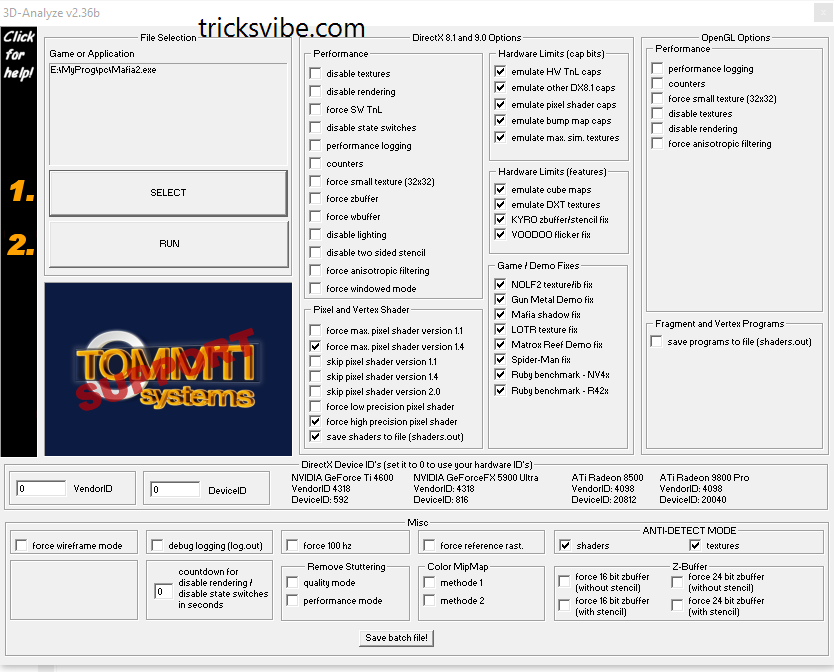
6. Now after configuring the whole software, just press "RUN" option and then just wait and see how your game runs automatically.
You can even save the batch settings for every single using the Save Batch File! option provided below in the tool.
So now every person who do not want to waste money on graphic card for a playing a single game, he can easily use this tool for making that game run pretty easily. Well but I surely recommend that if you are a gaming lover then you should have  this tool for awesome gaming experience.

Its all done...!!

Enjoy....!!

If You Want To Get Whatsapp Notifications Of All Stuffs  Deals & Loots, directly in your Inbox.
Do, Subscribe for WhatsApp Alert & Get All New Updates Directly In Your Inbox.
Type "SUB TV" And Send It To "+918574847699" From Your WhatsApp.

Or You Can Also Go For Email Subscription From The Right Middle Part Of This Post.

Have A Awesome Day Ahead... :-)

Thanks!!!

Read more

Monday, March 07, 2016

NOTEPAD Tricks

Hello Readers...

Notepad is a simple text editor which is provided by Microsoft in every version of Windows. It is helpful when we want to create a note. The files created by Notepad are saved in .txt format which is supported by every text editor.

Many of us don't know but there is alot of extensions along with .txt which is supported by Notepad and itself hold many amazing commands, tricks and hacks to make it more productive for you.
Today I'm gonna tell you some trick's and hacks that you can use to get most out of Notepad and amaze your friends.

1. CREATE DIARY ON NOTEPAD
This Notepad trick will allow you to create Notepad note. This trick will give you a format in such a way that whenever you edit your note, it will get saved with date and time stamp automatically.

Follow below step to create Diary👇

1) Open Notepad
2) Type .LOG in first line.
3) Save the file as Log.txt

Now, write something to the file and it will automatically get saved with edited date and time.☺

2.CREATE FAKE ERRORS ON WINDOWS
This is another cool trick that allows you to create Fake error messages. You can create any type of Fake error message with the help of this trick.


1) Open Notepad
2) Type X=Msgbox(“Message Here”,0+16,”Title Here”)
3) Replace Message Here and Title Here with your Error Message and Error-Window Title respectively.
4) Save the file with error.vbs.

Now, click the file and you will get your customized error message.


3. Force Shutdown On Your Windows System

This trick will let you force shutdown your Windows in a single-click. So, if you don’t want to waste three clicks (Start > Turn Off Computer > Turn Off), this trick will help you in that.
Follow below steps

1.Open Notepad
2.Paste @echo off in first line.
3.Paste msg * Shutdown computer in second line.
4.Paste shutdown -c “Sleep Tight” -s in third line
Save the file with .BAT extension. For example, shutdown.bat
5.Click on your file and it will force shutdown your Windows.


4. How to Make Your Desktop/Laptop Speakable What You Want.

This trick will help you to create a software which will speak whatever you want.
1.Open Notepad
2.Copy & paste this command:
Dim message, sapi
message=InputBox(“What do you want me to say?”,”Speak to Me”)
Set sapi=CreateObject(“sapi.spvoice”)
sapi.Speak message

3. Save the file as speak.vbs.

Double-click the file and it will open a prompt. Enter the sentence you want your computer to speak
Click OK and Notepad will speak the sentence for you.

All these tricks for education purpose only.
Thanks for Visiting!!!


If You Want To Get Whatsapp Notifications Of All Deals & Loots......

Subscribe To Our Whatsapp Broadcasts & Get All New Update In Your Whatsapp MESSAGE "TV" TO "+918574847699"
Thanks!!!
Read more

Sunday, March 06, 2016

How To Use Two Account Of Same App In One Android Device Without having Root Access (For Example: Two WhatsApp).

Today i am going to show you. How to have two account of same social media app or games (like Facebook, WhatsApp, Clash Of Clans, castle clash and many more) on same android device, without having root access? Answer to this question is not that much difficult for me anymore. Follow this post for solution.
In these day, not every social media apps and games allows you to log in with more than one IDs or account. So what if one wishes to sign in with more then one IDs or account? Obviously he/she is supposed to sign out and sign in again and again until they get their job done or must have more then one device to access those apps at a same time. It is now possible for non rooted android users too, just because of an app named Parallel Space

Parallel Space is a an Android app which let you use two account of same social media app & games on same device without having root access. With the help of Parallel Space,
you can use two accounts easily. You can use two WhatsApp, two Instagram account, two Facebook account in an android phone that also without having any special kind of root access.. This ap,p is not only limited to social media kind of apps, you can also play games like clash of clan, castle clash or whichever requires login, with two accounts simultaneously in one android device.

Parallel Space is a new android app, which is available in playstore for free. This app have simple and clean UI and the best part of app is that it doesn't need "root access."

Check out the official Features listed in playstore –

👉Unique: Based on our unique container technology, Parallel Space is the only app in Google Play which allows you to run multiple accounts simultaneously in one android device without having root access.`
👉Powerful yet tiny: As small as 2MB.
👉Facebook: Connect different friends with second Facebook account
👉Instagram: Share different photos with second Instagram account
👉Games: Play two accounts at the same time and double up the fun!
👉Parallel Space supports 99% of apps in Google Play, explore it by yourself now.

How to use-
1. First download and install PARALLEL SPACE app from google play store.
2. Open it & skip welcome screen.
3. Now it’s time to configure parallel space. Tap on ‘+’ symbol to add an account. It will show you the screen of  all the apps you have installed, just choose the apps you wish to use with two IDs or account.

4.Now you will see those apps on parallelspace's home screen. Now open the app and do login for second account with another ID, you wish to use simultaneously.
5. The app will show with a suffix of Parallel Space in your recent list.

You can also change the setting of app like SWIPE TO PARALLEL SPACE which let you open the app by swiping from left or right corners.

Its all done...!!

Enjoy....!!

If you like our work, do like our Facebook page here.

If You Want To Get Whatsapp Notifications Of All Stuffs  Deals & Loots, directly in you Inbox.
Do, Subscribe for WhatsApp Alert & Get All New Updates Directly In Your Inbox.
Type "SUB TV" And Send It To "+918574847699" From Your WhatsApp.

Or You Can Also Go For Email Subscription From The Right Middle Part Of This Post.

Have A Awesome Day Ahead... :)

Thanks!!!
Read more

Saturday, March 05, 2016

Best Alternative For BLOGGER On Android: BLOGGEROID FOR BLOGGER


Many of us can't creat post just because we dont get enough time to work on our laptop and make it done punctually. So we try to find out something, mobile friendly apps to creat posts, but unfortunately BLOGGERS app by Google is quiet buggy and won't work properly. So after many days of workout on Android I finally got perfect app, namely BLOGGEROID without any bugs and with few more features, as it was to be in BLOGGER by Google.


One can download it from PLAYSTORE or click here.

Pros of BLOGGEROID for android on behalf of BLOGGER by Google :


-Firstly you will won't see any error like 'Can't publish post', very common one :p.

-You can add any number of images anywhere in your post wherever you desire.

-3.5 mb of app, never lags, with very simple and sober or can too say it decent UI. Which you can never say for BLOGGER by Google.

-You can save posts in SDCARD, weird complement but very useful in reality :p.

Sample images:


The features of BLOGGER I miss over BLOGGEROID are link integrator, and text customization feature wich I do by visiting the website.

That's all, you are done to go, download it and have a look of this amazing app.

Thumbs up for #BLOGGEROID. #BLOGGEROID_for_bloggers.


Do Please, like , comment, share if i really helped you by this short and sweet post.


Have a good time ahead :)
Read more

Wednesday, March 02, 2016

What Is SEO? Common Myths And Tips For SEO, SEARCH ENGINE OPTIMIZATION.


SEO (SEARCH ENGINE OPTIMIZATION)

Three words from acronym SEO i.e SEARCH, ENGINE and OPTIMIZATION itself is sufficient to let you know its importance and significance.

SEARCH: Its something what people search or want to know about.

ENGINE: some sort of device or thing which make us do the desire task easily.

OPTIMIZATION: It something which deals with quality, quantity or any sort of reference you bind up upon and want to make it as much better as you want.


Simply SEO in terms of WORLD WIDE WEB is something which deals with, how frequently you are being noticed on web on behalf of quality of your content i.e how relevant and definitive your content is. Google one of the world's best search engine or many other sort out the links or assigns rank  of many links, websites, blogs, vlogs (video blog: youtube, dailymotion etc) and so on, on the basis of quality, popularity, clarity and vital nature of you content which you fed in WORLD WIDE WEBs directory.

Some Common Myth About SEO:

-Having high traffic means website is well optimised. No, it isn't the case our here only quality and importance of the content is considered.

-Providing lots of tags and lebel may result in good search engine optimisation. No, adding too much tags or labels will lead your content to be of nowhere. Actually google and other search engines such as yahoo, bing etc manages your content in specific stream from which they belong and show them where they are required. Firstly adding lots of tags never affects the traffic on your post and lastly if it does so, then why we people make it complicated by providing lots of alternatives. Simply try to be specific and use as much tags and labels as required, don't overwhelm it. For example if a person standing on a four-way asking someone for the holy places to visit and person responds him telling every way have some specific holy importance and here every way goes to some temple, mosque, church and so on. Now get in flash back and imagine the case of person asking for temple nearby, things get simple in this way. so always try to be specific that's it..!

Thing to do for SEARCH ENGINE OPTIMIZATION:

-Be clear and precise in your matter try to maintain QUALITY.

-Try to explain your content in lucid way so one can understand it easily and your readers can get their complete amusement in your content.

-Try to have a responsive (simple ,sober,and easy to load) templets (Theme).

-Post your contents link on social media with hash (#) tag of some important keywords.

-Get your website on webmaster (google).

-Site linking, promote others website and get yours too done. something symbiotic :p.

-Sharing flexibility(share buttons) is most needed.

-Try to think of trending and unique topics, simply create your own thing instead of copying it from somewhere else.

                                we'ill discuss about this in brief later, some other day.


Do share if you like our work and comment below for any query.


VIBE ON....!

Have A Good Time Ahead... :)
Read more

Monday, January 18, 2016

Android Emulator for MICROSOFT WINDOWS LINUX MAC OS (How to use android on pc)

Hi guys,

Whether nowadays we have an 80k phone or an 8k phone, still we need a android emulators on PC( LINUX, WINDOWS or MAC). So Today i am gonna tell you all of the emulators available in the market for any OS.


Common for all of them :

I. Softwares:
1. Genymotion

2. Install Android x86 (for kitkat android 4.4 x86 r2.iso is working only) in any virtual machine (like vmware, virtual box etc)

II: Cloud Services:
1. Appetize

2. Manymo


Only for MAC OS:

1. Xamarin Android Player

2. Andy

3. Droid4X


Only for LINUX OS:

No Individual Tools :(


Only for WINDOWS OS:

1. Windroye

2. Bluestack

3. Xamarin Android Player

4. Andy

5. AMIDuOS

6. Droid4X

7. YouWave

8. MEmu

9. Nox APP Player


Thanks for visiting.
Wish if it helped y'all.

Read more

How to install ADB+FASTBOOT in LINUX OS

Hello guys,

As we all know that the best OS for doing Development tasks is LINUX, so today i am gonna tell you guys to install "ADB+FASTBOOT" in LINUX with simply installing ".sh" scripts.


Steps:

1. Download this zip from here.

2. Extract it.

3. Open terminal emulator ( shortcut key: alt + ctrl + T )

4. Now just type the following command:

#sudo -i                                                  (then enter your passwod)
#cd "Directory where you extracted that zip" (eg: cd /home/username/Download/V1.Automatic-Adb+Fastboot_Linux_Installer/)
# ./Adb+Fastboot_Drivers_installer.sh

Done

Comment below if any problem........... Have a good time.... :)
Read more