Showing posts with label TIPS N TRICKS. Show all posts

Thursday, May 05, 2016

How To Use Whatsapp Without Phone Number

Instant messaging service WhatsApp has become the part of our lives. But do you know you can also use this service without having to give your phone number?
Try these steps and you should be able to use WhatsApp without phone number.
1. At first uninstall WhatsApp on your phone.
2.Now again download and reinstall WhatsApp on your mobile phone.
3.Keep your phone on flight mode so that all the messaging services are blocked/stopped on it.
4.Now put any number you like on your reinstalled WhatsApp. This will let WhatsApp accept your number but it won't be able to send any message to you for verification
5.However, without verification, user will not be allowed to use WhatsApp. So WhatsApp will ask for an alternate process. Click for 'Verify through SMS'. Here you can give your email id.
6. Now click the set button and immediately click the cancel button. This will stop the authorisation process.
7. Now install the 'Spoof text message'app.
8. Now, fill in the details when you complete the above mentioned process
TO: +447900347295
From: + (country code) (mobile number)
Message: Your email id
9.Now your details will be sent to this number and you will be able to use WhatsApp without your phone number

All done.  Now you are able to use Whatsapp without phone number. 

Thanks for visiting, Have a good day ahead. 
Read more

Saturday, March 12, 2016

Scope Of Professional Blogging | Possible Income | Career In Blogging

How one can build their career in blogging? How much one can earn from blogging? Is blogging the right career choice?.........????


If these kinds of question have overwhelmed your mind then you are at right place because today I am going to discuss about professional blogging, scope of blogging, things one should do and should not to do for being a remarkable blogger and achieve a good brand value for oneself as a beseeching blogger.

As being a blogger and guest writer me to have faced these things a lot. Due to lots of competition in the world of internet I never felt that i'll be doing it in real life as a reputed blogger, even in my dreams too. But you can see that am doing it and i love to do blogging and share my experiences I have made on the globe of World Wide Web.

If you are getting it as easy as one night job then never ever be serious about blogging or even do imagine yourself as successful blogger or simply don't waste your time our here. I know it's getting bit rude but its the true world around you i am trying to show you all.

Frankly, if one have just started in blogging then they must do focus on niche, content of their blog and way to attract their audience by posting unique thing on their blog. I didn't meant that you need to think totally out of world for being a successful blogger, Even though if you can do it for your blog then it will be something like awesome beauty of  human mind what we say god gifted. :)

Firstly i'll like to say that no one is going to get you money for free, no matter what you do. Blogging is too just like business and just like in business how planning, punctuality, management, quality, loyalty, and promotion i.e how you attract your customers have their own importance, is same in the case of blogging. No business is 100% safe. Simply, how passionate and dedicated you are for blogging as a career?

If you are one having your own things to start and have some patience then definitely you can be your own boss.

Decide Your NICHE:-


If you have decided to grow blogging as your careers choice then for being a successful blogger you need to think about the services you are going serve on you blog or get you NICHE(specific topic) decided. I mean you need to think about what kind of things people do search for and how you can serve them in better way from you blog contents.Write posts on your blog so as people get complete amusement in your content and they can't stop them self to read your complete post on you blog. Simply try to get your own brand value do never copy posts from other sources and do take care of the QUALITY you have to maintain throughout in your post.

You Can Write Blogs About Something You Know better (For Example):-

i: Write Stories (Fiction/Realistic).
ii; House Wife's Do Write About Recipes.
iii:Technology Blog.
iv: Poems.
v: Gadget Reviewing Blog.
vi: Educational Blog.
vii :Socialistic Responsive Blog and many more.

Focus On QUALITY:-


One of the very important thing is to take care of the quality of the details or the stuffs you are writing on. People do focus on the key words while creating posts so as to get SEO friendly posts, but keyword solely is not only the key thing to get on for optimized posts. There are several factors such as Bounce Rate, Time Spent By Your Readers On Your Blog or Website (ill discuss about in my other post) and many other factors do take part to rank you post as SEO friendly post. So simply try to write in a way so that your readers can experience complete amusement while reading your post. Do not jumble up your contents quality by using more then enough keyword in you blogs post. Do add credits for the things you add from other blogs, respect other bloggers for their work. This shows the ethics you have and you may win your readers heart. :)

What is SEO?

Work For TRAFFIC:-


You will notice gradual increase in traffic depending upon the number of posts you have published on your blog. Traffic might be low in starting but it will definitely increase if you took care of Quality, usefulness of your post and haven't copied it from any other blog or website. Do focus on ways to enhance traffic with the help of social media, Google webmaster, Analytic and so on, I will discuss about in brief later some other day.

Set TARGETED TASK:-


One of the most important thing, personally as well as professionally, decide your day task and complete it any how, no matter how much extra time you will have to spend on it. By doing so you you will develop bunch of professional attributes which will let you know, how deeply you take blogging as your career. Simply decide the number of posts you have to create in a week time line and do complete it at any cost being completely involved in it.

Keep PATIENCE:


Blogging is not like, which will make you billionaire by night. It is slow but firm if succeeded. Initially many bloggers gets frustrated due to adsense approval criteria obviously one of the most difficult task every blogger do face. Consider these things in a positive way, take it as an opportunity to grow or harden your professional blogging habit or professional etiquette. Simply think that you are being trained for the ups and downs you are going to face in future and do never give up blogging habit.

The First Ever Motivation MONETIZATION:-


Obviously, you can consider it as motivation to carry on with your blogging habit as a real time blogger.

How Much One Can Earn From Blogging?

There is no limit on how much one can earn from blogging, it may be 0.1 dollar to Unlimited dollars a day (USD).

Some Top Professional Bloggers Of All Time (Name anchored with their blog):-

1: Michael Arrington

2: Nick Denton

3: Arianna Huffington

4: Pete Cashmore

5: Mario Lavandeira

6: Vitaly Friedman


Thank you...! for reading this post :) . Do comment, for any query and suggestion.

If you like our work, do like our Facebook page here.

If You Want To Get Whatsapp Notifications Of All Stuffs Deals & Loots, directly in you Inbox.
Do, Subscribe for WhatsApp Alert & Get All New Updates Directly In Your Inbox.
Type "SUB TV" And Send It To "+918574847699" From Your WhatsApp.

Or You Can Also Go For Email Subscription From The Right Middle Part Of This Post.

Have A Awesome Day Ahead... :)
Read more

Thursday, March 10, 2016

How To Increase RAM In MICROSOFT Windows Using Pen Drive

Hello Readers!!
Most of us knows that RAM is known as RANDOM ACCESS MEMORY. It is the main memory of device which executes all process and perform every task.
So basically, More our device has Ram, more increase in speed of run time.
If we run Number of tasks at the same time then you may be face not responding problem Because Ram doesn't meet the requirements of application. In that case you have to increase you Ram.
Its not possible for everyone to upgrade High Grade Ram. So the only best possible way for them is to use Pendrive as Ram.
This is a good feature of Windows that allows to increase your Virtual Memory using Pendrive. This virtual memory doesn't have same performance as compare to actual ram device. But this concept increase your paging memory and some other functioning which means your overall performance became good and some application runs smoothly without lagging.
So follow below guideline carefully for using your pen drive as ram.
HOW TO USE PEN DRIVE AS RAM IN WINDOWS--
1.First of all insert your pen drive.
2.Then open My Computer and right click >> Then open Properties.
3.Now Properties window will appear, then click on Advanced system settings from left side.
4.Then in Advanced tab click on Settings button appear in Performance tab.
5.Again new window will appear then click on Advanced tab.
6.In advanced tab there is an option of Virtual Memory box, then click on Change Button.
After click change button “Virtual settings” will appear.


  • Now unchecked the box of  “Automatically Manage Page Size Feature”.
  • Then in custom  size add your Pen drive current same in below format
  • Now add same “Value” in both boxes and click on apply button.

  • Restart your PC or Laptop and now pen drive will work as “Virtual Ram”.


Remember..
Always safely eject your Pendrive. Direct removal may leads to device damage.
In Virtual Memory method, If you want to convert back your Pendrive into Normal. Then again open Virtual Settings and remove custom memory value and choose Default settings by checking “Automatically Manage Paging Size”.
.Always add 10 mb less from current available size,It is better for device safety.  
Comment down if you face any problem!

Thanks For Visiting.

If You Want To Get Whatsapp Notifications Of All Stuffs  Deals & Loots, directly in your Inbox.
Do, Subscribe for WhatsApp Alert & Get All New Updates Directly In Your Inbox.
Type "SUB TV" And Send It To "+918574847699" From Your WhatsApp.

Or You Can Also Go For Email Subscription From The Right Middle Part Of This Post.

Have A Awesome Day Ahead... 🙌
Read more

Wednesday, March 09, 2016

HOW TO RUN HIGH GRAPHICS GAME WITHOUT GRAPHICS CARD INSTALLED


Graphic card plays a important role in PC performance & Gaming environment. Well for the outmost gaming experience its recommended to go with the best graphic card option else you might face errors.
Well if you are a gaming freak then you might have noticed that few games actually do not need a graphic card to be installed but they can be played pretty well without installing any graphic card, so today I will be showing you how you can easily play all those games without any graphic card installed.
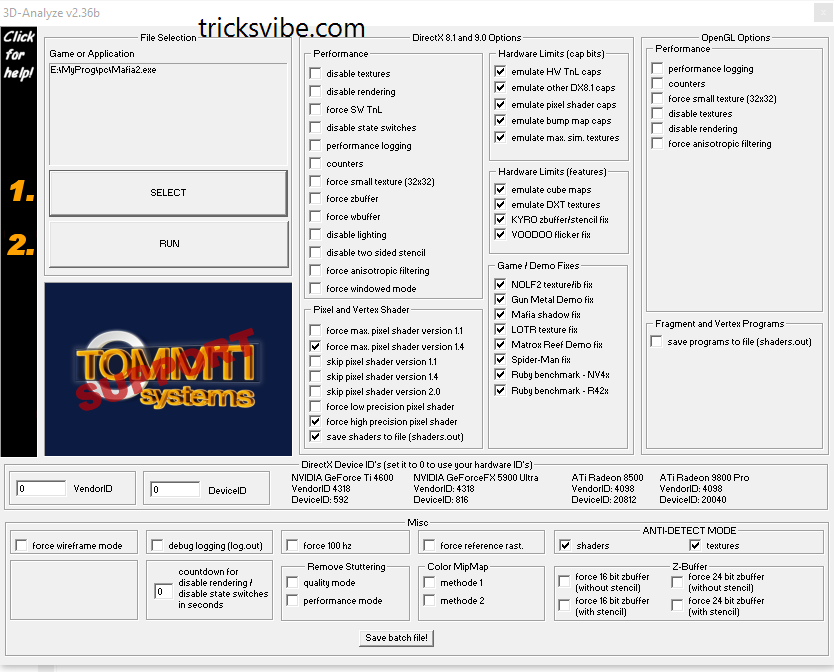
So we are going to use 3D-Analyzer, well you also heard about the swiftshader files that worked great, but now that method is too old and we have this amazing tool that can be used as the best graphic card emulator.

How It works...

So basically this tool simply utilizes your RAM as a graphic card memory, so suppose you have 2 GB installed as your RAM then it will access near about 256 MB as the graphic card memory and then keep rest as the normal RAM.

So this is a way that simply fakes the system in having a nice graphic card but its still running on single RAM. So now follow below steps on how this tool really works.
1. Download 3D-Analyzer Tool for Windows.
2. Now it's a .zip package so make sure to extract the package to get .exe file.
3.So now as you will open this tool you will see a big Select button, simply press that too choose your game file.

4. So make sure to navigate to the original game directory and select the .exe file of your game you wish to play.
5. Now after selecting that game make sure to tweak settings as mentioned below in the image, just select every setting like below.

6. Now after configuring the whole software, just press "RUN" option and then just wait and see how your game runs automatically.
You can even save the batch settings for every single using the Save Batch File! option provided below in the tool.
So now every person who do not want to waste money on graphic card for a playing a single game, he can easily use this tool for making that game run pretty easily. Well but I surely recommend that if you are a gaming lover then you should have  this tool for awesome gaming experience.

Its all done...!!

Enjoy....!!

If You Want To Get Whatsapp Notifications Of All Stuffs  Deals & Loots, directly in your Inbox.
Do, Subscribe for WhatsApp Alert & Get All New Updates Directly In Your Inbox.
Type "SUB TV" And Send It To "+918574847699" From Your WhatsApp.

Or You Can Also Go For Email Subscription From The Right Middle Part Of This Post.

Have A Awesome Day Ahead... :-)

Thanks!!!

Read more

Monday, March 07, 2016

NOTEPAD Tricks

Hello Readers...

Notepad is a simple text editor which is provided by Microsoft in every version of Windows. It is helpful when we want to create a note. The files created by Notepad are saved in .txt format which is supported by every text editor.

Many of us don't know but there is alot of extensions along with .txt which is supported by Notepad and itself hold many amazing commands, tricks and hacks to make it more productive for you.
Today I'm gonna tell you some trick's and hacks that you can use to get most out of Notepad and amaze your friends.

1. CREATE DIARY ON NOTEPAD
This Notepad trick will allow you to create Notepad note. This trick will give you a format in such a way that whenever you edit your note, it will get saved with date and time stamp automatically.

Follow below step to create Diary👇

1) Open Notepad
2) Type .LOG in first line.
3) Save the file as Log.txt

Now, write something to the file and it will automatically get saved with edited date and time.☺

2.CREATE FAKE ERRORS ON WINDOWS
This is another cool trick that allows you to create Fake error messages. You can create any type of Fake error message with the help of this trick.


1) Open Notepad
2) Type X=Msgbox(“Message Here”,0+16,”Title Here”)
3) Replace Message Here and Title Here with your Error Message and Error-Window Title respectively.
4) Save the file with error.vbs.

Now, click the file and you will get your customized error message.


3. Force Shutdown On Your Windows System

This trick will let you force shutdown your Windows in a single-click. So, if you don’t want to waste three clicks (Start > Turn Off Computer > Turn Off), this trick will help you in that.
Follow below steps

1.Open Notepad
2.Paste @echo off in first line.
3.Paste msg * Shutdown computer in second line.
4.Paste shutdown -c “Sleep Tight” -s in third line
Save the file with .BAT extension. For example, shutdown.bat
5.Click on your file and it will force shutdown your Windows.


4. How to Make Your Desktop/Laptop Speakable What You Want.

This trick will help you to create a software which will speak whatever you want.
1.Open Notepad
2.Copy & paste this command:
Dim message, sapi
message=InputBox(“What do you want me to say?”,”Speak to Me”)
Set sapi=CreateObject(“sapi.spvoice”)
sapi.Speak message

3. Save the file as speak.vbs.

Double-click the file and it will open a prompt. Enter the sentence you want your computer to speak
Click OK and Notepad will speak the sentence for you.

All these tricks for education purpose only.
Thanks for Visiting!!!


If You Want To Get Whatsapp Notifications Of All Deals & Loots......

Subscribe To Our Whatsapp Broadcasts & Get All New Update In Your Whatsapp MESSAGE "TV" TO "+918574847699"
Thanks!!!
Read more

Monday, January 18, 2016

Android Emulator for MICROSOFT WINDOWS LINUX MAC OS (How to use android on pc)

Hi guys,

Whether nowadays we have an 80k phone or an 8k phone, still we need a android emulators on PC( LINUX, WINDOWS or MAC). So Today i am gonna tell you all of the emulators available in the market for any OS.


Common for all of them :

I. Softwares:
1. Genymotion

2. Install Android x86 (for kitkat android 4.4 x86 r2.iso is working only) in any virtual machine (like vmware, virtual box etc)

II: Cloud Services:
1. Appetize

2. Manymo


Only for MAC OS:

1. Xamarin Android Player

2. Andy

3. Droid4X


Only for LINUX OS:

No Individual Tools :(


Only for WINDOWS OS:

1. Windroye

2. Bluestack

3. Xamarin Android Player

4. Andy

5. AMIDuOS

6. Droid4X

7. YouWave

8. MEmu

9. Nox APP Player


Thanks for visiting.
Wish if it helped y'all.

Read more

How to enable "init.d" in MIUI ROMs(and phones too)

Hi guys,

Nowadays since network data is very important in everyone's life and the best way to save it from internal apps or updates is "firewall" like "droidwall, AFwal+ etc".
and to use these firewalls perfectly in MIUI ROMs, "init.d" file must be there(which is not in MIUI ROMs). So here are the steps for enabling or installing "init.d":

Method 1(easy and 99% working):

1. Download "init.d toggler" from google playstore or this link .

2. Open this app and press "enable init.d"


Method 2(complex for non linux users and 100% working but try it if method 1 failed for you):

1. Download this "term-init.sh" from here  written by "Ryuinferno @ XDA".

2. Open  terminal emultaor.

3. Now its for the fun things (typing commands):

#su   (grant root access when prompted)
#sh "loctaion of term-ini.sh"  (for eg: sh /storage/sdcard0/Downloads/term-init.sh)

4. The script will execute, now just follow the instructions showed.


Thanks for visiting.
Wish it helped you all.


Read more