Showing posts with label tips. Show all posts

Wednesday, March 09, 2016

HOW TO RUN HIGH GRAPHICS GAME WITHOUT GRAPHICS CARD INSTALLED


Graphic card plays a important role in PC performance & Gaming environment. Well for the outmost gaming experience its recommended to go with the best graphic card option else you might face errors.
Well if you are a gaming freak then you might have noticed that few games actually do not need a graphic card to be installed but they can be played pretty well without installing any graphic card, so today I will be showing you how you can easily play all those games without any graphic card installed.
So we are going to use 3D-Analyzer, well you also heard about the swiftshader files that worked great, but now that method is too old and we have this amazing tool that can be used as the best graphic card emulator.

How It works...

So basically this tool simply utilizes your RAM as a graphic card memory, so suppose you have 2 GB installed as your RAM then it will access near about 256 MB as the graphic card memory and then keep rest as the normal RAM.

So this is a way that simply fakes the system in having a nice graphic card but its still running on single RAM. So now follow below steps on how this tool really works.
1. Download 3D-Analyzer Tool for Windows.
2. Now it's a .zip package so make sure to extract the package to get .exe file.
3.So now as you will open this tool you will see a big Select button, simply press that too choose your game file.

4. So make sure to navigate to the original game directory and select the .exe file of your game you wish to play.
5. Now after selecting that game make sure to tweak settings as mentioned below in the image, just select every setting like below.
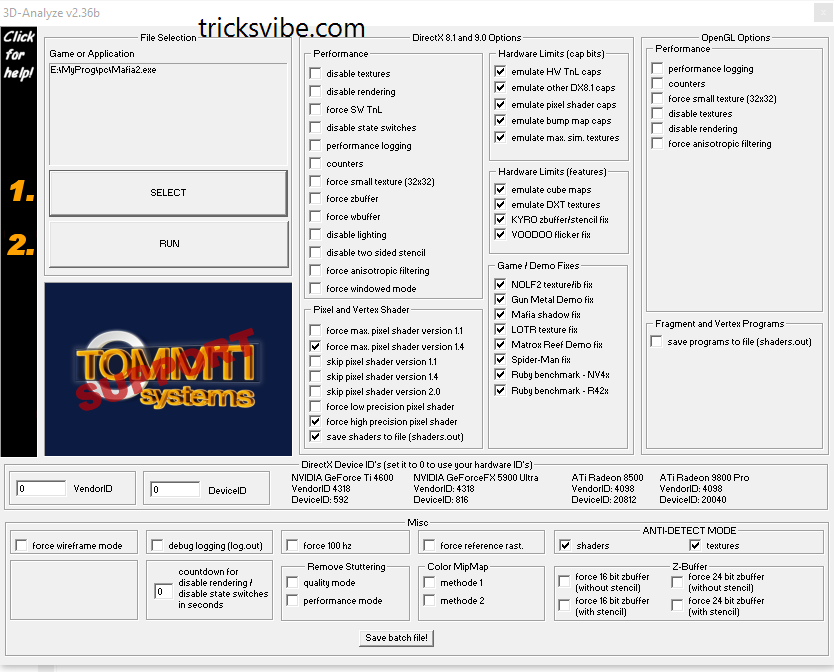
6. Now after configuring the whole software, just press "RUN" option and then just wait and see how your game runs automatically.
You can even save the batch settings for every single using the Save Batch File! option provided below in the tool.
So now every person who do not want to waste money on graphic card for a playing a single game, he can easily use this tool for making that game run pretty easily. Well but I surely recommend that if you are a gaming lover then you should have  this tool for awesome gaming experience.

Its all done...!!

Enjoy....!!

If You Want To Get Whatsapp Notifications Of All Stuffs  Deals & Loots, directly in your Inbox.
Do, Subscribe for WhatsApp Alert & Get All New Updates Directly In Your Inbox.
Type "SUB TV" And Send It To "+918574847699" From Your WhatsApp.

Or You Can Also Go For Email Subscription From The Right Middle Part Of This Post.

Have A Awesome Day Ahead... :-)

Thanks!!!

Read more

Monday, March 07, 2016

NOTEPAD Tricks

Hello Readers...

Notepad is a simple text editor which is provided by Microsoft in every version of Windows. It is helpful when we want to create a note. The files created by Notepad are saved in .txt format which is supported by every text editor.

Many of us don't know but there is alot of extensions along with .txt which is supported by Notepad and itself hold many amazing commands, tricks and hacks to make it more productive for you.
Today I'm gonna tell you some trick's and hacks that you can use to get most out of Notepad and amaze your friends.

1. CREATE DIARY ON NOTEPAD
This Notepad trick will allow you to create Notepad note. This trick will give you a format in such a way that whenever you edit your note, it will get saved with date and time stamp automatically.

Follow below step to create Diary👇

1) Open Notepad
2) Type .LOG in first line.
3) Save the file as Log.txt

Now, write something to the file and it will automatically get saved with edited date and time.☺

2.CREATE FAKE ERRORS ON WINDOWS
This is another cool trick that allows you to create Fake error messages. You can create any type of Fake error message with the help of this trick.


1) Open Notepad
2) Type X=Msgbox(“Message Here”,0+16,”Title Here”)
3) Replace Message Here and Title Here with your Error Message and Error-Window Title respectively.
4) Save the file with error.vbs.

Now, click the file and you will get your customized error message.


3. Force Shutdown On Your Windows System

This trick will let you force shutdown your Windows in a single-click. So, if you don’t want to waste three clicks (Start > Turn Off Computer > Turn Off), this trick will help you in that.
Follow below steps

1.Open Notepad
2.Paste @echo off in first line.
3.Paste msg * Shutdown computer in second line.
4.Paste shutdown -c “Sleep Tight” -s in third line
Save the file with .BAT extension. For example, shutdown.bat
5.Click on your file and it will force shutdown your Windows.


4. How to Make Your Desktop/Laptop Speakable What You Want.

This trick will help you to create a software which will speak whatever you want.
1.Open Notepad
2.Copy & paste this command:
Dim message, sapi
message=InputBox(“What do you want me to say?”,”Speak to Me”)
Set sapi=CreateObject(“sapi.spvoice”)
sapi.Speak message

3. Save the file as speak.vbs.

Double-click the file and it will open a prompt. Enter the sentence you want your computer to speak
Click OK and Notepad will speak the sentence for you.

All these tricks for education purpose only.
Thanks for Visiting!!!


If You Want To Get Whatsapp Notifications Of All Deals & Loots......

Subscribe To Our Whatsapp Broadcasts & Get All New Update In Your Whatsapp MESSAGE "TV" TO "+918574847699"
Thanks!!!
Read more

Sunday, March 06, 2016

How To Use Two Account Of Same App In One Android Device Without having Root Access (For Example: Two WhatsApp).

Today i am going to show you. How to have two account of same social media app or games (like Facebook, WhatsApp, Clash Of Clans, castle clash and many more) on same android device, without having root access? Answer to this question is not that much difficult for me anymore. Follow this post for solution.
In these day, not every social media apps and games allows you to log in with more than one IDs or account. So what if one wishes to sign in with more then one IDs or account? Obviously he/she is supposed to sign out and sign in again and again until they get their job done or must have more then one device to access those apps at a same time. It is now possible for non rooted android users too, just because of an app named Parallel Space

Parallel Space is a an Android app which let you use two account of same social media app & games on same device without having root access. With the help of Parallel Space,
you can use two accounts easily. You can use two WhatsApp, two Instagram account, two Facebook account in an android phone that also without having any special kind of root access.. This ap,p is not only limited to social media kind of apps, you can also play games like clash of clan, castle clash or whichever requires login, with two accounts simultaneously in one android device.

Parallel Space is a new android app, which is available in playstore for free. This app have simple and clean UI and the best part of app is that it doesn't need "root access."

Check out the official Features listed in playstore –

👉Unique: Based on our unique container technology, Parallel Space is the only app in Google Play which allows you to run multiple accounts simultaneously in one android device without having root access.`
👉Powerful yet tiny: As small as 2MB.
👉Facebook: Connect different friends with second Facebook account
👉Instagram: Share different photos with second Instagram account
👉Games: Play two accounts at the same time and double up the fun!
👉Parallel Space supports 99% of apps in Google Play, explore it by yourself now.

How to use-
1. First download and install PARALLEL SPACE app from google play store.
2. Open it & skip welcome screen.
3. Now it’s time to configure parallel space. Tap on ‘+’ symbol to add an account. It will show you the screen of  all the apps you have installed, just choose the apps you wish to use with two IDs or account.

4.Now you will see those apps on parallelspace's home screen. Now open the app and do login for second account with another ID, you wish to use simultaneously.
5. The app will show with a suffix of Parallel Space in your recent list.

You can also change the setting of app like SWIPE TO PARALLEL SPACE which let you open the app by swiping from left or right corners.

Its all done...!!

Enjoy....!!

If you like our work, do like our Facebook page here.

If You Want To Get Whatsapp Notifications Of All Stuffs  Deals & Loots, directly in you Inbox.
Do, Subscribe for WhatsApp Alert & Get All New Updates Directly In Your Inbox.
Type "SUB TV" And Send It To "+918574847699" From Your WhatsApp.

Or You Can Also Go For Email Subscription From The Right Middle Part Of This Post.

Have A Awesome Day Ahead... :)

Thanks!!!
Read more

Saturday, March 05, 2016

Best Alternative For BLOGGER On Android: BLOGGEROID FOR BLOGGER


Many of us can't creat post just because we dont get enough time to work on our laptop and make it done punctually. So we try to find out something, mobile friendly apps to creat posts, but unfortunately BLOGGERS app by Google is quiet buggy and won't work properly. So after many days of workout on Android I finally got perfect app, namely BLOGGEROID without any bugs and with few more features, as it was to be in BLOGGER by Google.


One can download it from PLAYSTORE or click here.

Pros of BLOGGEROID for android on behalf of BLOGGER by Google :


-Firstly you will won't see any error like 'Can't publish post', very common one :p.

-You can add any number of images anywhere in your post wherever you desire.

-3.5 mb of app, never lags, with very simple and sober or can too say it decent UI. Which you can never say for BLOGGER by Google.

-You can save posts in SDCARD, weird complement but very useful in reality :p.

Sample images:


The features of BLOGGER I miss over BLOGGEROID are link integrator, and text customization feature wich I do by visiting the website.

That's all, you are done to go, download it and have a look of this amazing app.

Thumbs up for #BLOGGEROID. #BLOGGEROID_for_bloggers.


Do Please, like , comment, share if i really helped you by this short and sweet post.


Have a good time ahead :)
Read more

Wednesday, March 02, 2016

What Is SEO? Common Myths And Tips For SEO, SEARCH ENGINE OPTIMIZATION.


SEO (SEARCH ENGINE OPTIMIZATION)

Three words from acronym SEO i.e SEARCH, ENGINE and OPTIMIZATION itself is sufficient to let you know its importance and significance.

SEARCH: Its something what people search or want to know about.

ENGINE: some sort of device or thing which make us do the desire task easily.

OPTIMIZATION: It something which deals with quality, quantity or any sort of reference you bind up upon and want to make it as much better as you want.


Simply SEO in terms of WORLD WIDE WEB is something which deals with, how frequently you are being noticed on web on behalf of quality of your content i.e how relevant and definitive your content is. Google one of the world's best search engine or many other sort out the links or assigns rank  of many links, websites, blogs, vlogs (video blog: youtube, dailymotion etc) and so on, on the basis of quality, popularity, clarity and vital nature of you content which you fed in WORLD WIDE WEBs directory.

Some Common Myth About SEO:

-Having high traffic means website is well optimised. No, it isn't the case our here only quality and importance of the content is considered.

-Providing lots of tags and lebel may result in good search engine optimisation. No, adding too much tags or labels will lead your content to be of nowhere. Actually google and other search engines such as yahoo, bing etc manages your content in specific stream from which they belong and show them where they are required. Firstly adding lots of tags never affects the traffic on your post and lastly if it does so, then why we people make it complicated by providing lots of alternatives. Simply try to be specific and use as much tags and labels as required, don't overwhelm it. For example if a person standing on a four-way asking someone for the holy places to visit and person responds him telling every way have some specific holy importance and here every way goes to some temple, mosque, church and so on. Now get in flash back and imagine the case of person asking for temple nearby, things get simple in this way. so always try to be specific that's it..!

Thing to do for SEARCH ENGINE OPTIMIZATION:

-Be clear and precise in your matter try to maintain QUALITY.

-Try to explain your content in lucid way so one can understand it easily and your readers can get their complete amusement in your content.

-Try to have a responsive (simple ,sober,and easy to load) templets (Theme).

-Post your contents link on social media with hash (#) tag of some important keywords.

-Get your website on webmaster (google).

-Site linking, promote others website and get yours too done. something symbiotic :p.

-Sharing flexibility(share buttons) is most needed.

-Try to think of trending and unique topics, simply create your own thing instead of copying it from somewhere else.

                                we'ill discuss about this in brief later, some other day.


Do share if you like our work and comment below for any query.


VIBE ON....!

Have A Good Time Ahead... :)
Read more

Monday, January 18, 2016

Android Emulator for MICROSOFT WINDOWS LINUX MAC OS (How to use android on pc)

Hi guys,

Whether nowadays we have an 80k phone or an 8k phone, still we need a android emulators on PC( LINUX, WINDOWS or MAC). So Today i am gonna tell you all of the emulators available in the market for any OS.


Common for all of them :

I. Softwares:
1. Genymotion

2. Install Android x86 (for kitkat android 4.4 x86 r2.iso is working only) in any virtual machine (like vmware, virtual box etc)

II: Cloud Services:
1. Appetize

2. Manymo


Only for MAC OS:

1. Xamarin Android Player

2. Andy

3. Droid4X


Only for LINUX OS:

No Individual Tools :(


Only for WINDOWS OS:

1. Windroye

2. Bluestack

3. Xamarin Android Player

4. Andy

5. AMIDuOS

6. Droid4X

7. YouWave

8. MEmu

9. Nox APP Player


Thanks for visiting.
Wish if it helped y'all.

Read more

How to install ADB+FASTBOOT in LINUX OS

Hello guys,

As we all know that the best OS for doing Development tasks is LINUX, so today i am gonna tell you guys to install "ADB+FASTBOOT" in LINUX with simply installing ".sh" scripts.


Steps:

1. Download this zip from here.

2. Extract it.

3. Open terminal emulator ( shortcut key: alt + ctrl + T )

4. Now just type the following command:

#sudo -i                                                  (then enter your passwod)
#cd "Directory where you extracted that zip" (eg: cd /home/username/Download/V1.Automatic-Adb+Fastboot_Linux_Installer/)
# ./Adb+Fastboot_Drivers_installer.sh

Done

Comment below if any problem........... Have a good time.... :)
Read more

How to enable "init.d" in MIUI ROMs(and phones too)

Hi guys,

Nowadays since network data is very important in everyone's life and the best way to save it from internal apps or updates is "firewall" like "droidwall, AFwal+ etc".
and to use these firewalls perfectly in MIUI ROMs, "init.d" file must be there(which is not in MIUI ROMs). So here are the steps for enabling or installing "init.d":

Method 1(easy and 99% working):

1. Download "init.d toggler" from google playstore or this link .

2. Open this app and press "enable init.d"


Method 2(complex for non linux users and 100% working but try it if method 1 failed for you):

1. Download this "term-init.sh" from here  written by "Ryuinferno @ XDA".

2. Open  terminal emultaor.

3. Now its for the fun things (typing commands):

#su   (grant root access when prompted)
#sh "loctaion of term-ini.sh"  (for eg: sh /storage/sdcard0/Downloads/term-init.sh)

4. The script will execute, now just follow the instructions showed.


Thanks for visiting.
Wish it helped you all.


Read more

How to install android sdk tools in ubuntu

Hello guys,

Today i am gonna tell you how to install android sdk in ubuntu.


steps:

1. Download android-sdk from official site

2. Now open terminal( shortcut key: alt+ctrl+T )

3. Extract the archive you just downloaded by typing command:

       #tar xvzf ~/android-sdk*.tgz

4. Now  get the root privileges for your account:

       #sudo su

5. Now install some Multi-Arch Packages:

     #apt-get install libstdc++6:i386 lib32z1 lib32ncurses5 libbz2-1.0

6. Now just relocate android sdk you just extracted:

     #chown -R root:root ~/android-sdk-linux*

     #chmod -R +xr ~/android-sdk-linux*

     #mv ~/android-sdk-linux* /opt/android-sdk-linux

7. Now install oracle-sun jdk:
  
    this is another tutorial,click here

8. Now inserting Android sdk tools into USER PATH:

       #su <username>

       #nano ~/.bashrc
     
       #export PATH=/opt/android-sdk-linux/tools:/opt/android-sdk-linux/platform-tools:$PATH

Note: Ctrl+Shift+v to Paste Content into nano
       Ctrl+x to Save and Exit
       Load New Settings by typing below written command:

       #bash                    

9. Now update android sdk tools and APIs:

       #cd /opt/android-sdk*/tools
       #sudo su -c "./android sdk"


Thanks for visiting.
Subscribe and follow me if you liked.
Read more

How to extract .img files in MICROSOFT windows


Hi Guys,


so today i m gonna show you "how to extract .img files in windows ".


requirements:


1. ext4 unpacker
2. ext2 explore
3. .img file u wanna extract ;)

steps:

1. open the ext4 unpacker.exe


2. select the .img file u wanna extract


3. save the file


4. now open ext2 explore as administrator
5. now goto file>open image in it.
6. now just save the selected file in a new folder if u want to.


Read more

IMEI null ERROR in SAMSUNG Devices

Hi guys,


So today I am gonna tell you guys about "how to repair unknown baseband/no signal/imei null only for samsung phones".

First of all it is very essential to know about the reason why this occured:

1. Upgrading your software update manually.

2. Flashing custom ROMs(some also flash custom kernel thats why).

3. Flashing custom kernels.

These are the reasons i have the most of time for this error.


So my suggestions to newbies are "precaution is better than cure always", always make a NANDroid backup before any flashing or upgrading.

As we all know that information related to "IMEI, MAC address of NICs, Vendor IDs etc". In MTK these are very easy to find and playwith but in samsung dont even try for it if you are a newbie because they ahve hidden it very well under EFS i.e, a system directory.

After alot of study and research I found out a solution ( if you have a NAND backup or not ) using a tool developed by an XDA member "LiquidPerfection", namely "EFS Professional".


Steps :

1. Download EFS professional.zip from here, extract it, open EFS professional.exe and click on "EFS professional".


2. Connect your device and click on Device info if you wanna see details of your phone(optional).


3. Now goto Restore tab and click format EFS and press OK (sometimes your EFS gets corrupted so just format EFS option can make it well) and reboot ( press *#06# and check if u got you imei back).


4. If still you got no success, then tick the option "repair unknown baseband/no signal" and then click on "restore".


5. Done now just goto settings or engineer mode or USSDs you have got your IMEI, MAC, IDs back.


Thanks for visiting guys.
I wish it helped you all.

#IMEI null
#broadband unavailable
#how to restore imei
#NVRAM error

Read more

Monday, December 28, 2015

Who is better BLOGGER or WORDPRESS?????

Why blogger is better than wordpress in some cases?
As we all know that wordpress is a  revolutionary way to make an awesome website but we also know that all the goods behaviour are impossible to find in a single. Recently I suffered from a major problem while using wordpress. SO, I decided to tell you about demerits of wordpress,before making site to wordpress think about these demerits.
The most common demerits of wordpress is its hosting problem. If you are going to setup a website then you have to manage a hosting. If you are thinking to use free hosting then think about space, bandwidth, RAM, CPU  etc.
Generally beginners try to make wordpress website by making the use of free hosting but they are in depth. They will never successful, the reason behind it is free web hosting services. They are so bad and everything is limited. You can’t expand your website. If sometimes more visitors come to your site then your site will  down. And you can’t do anything in that very situation instead of waiting.

Why everyone trying to setup site on wordpress?
It’s due to its unbeatable features and theme. If you are use wordpress then I no need to tell about its features. But here some beginner are also presents. So I will tell a little more about it.
The main features are its plugins, it is a revolutionary way to promote your site. It’s the identity of wordpress.I know your devil mind  thinking about site promotion by making the use of wordpress plugins. Yes you can promote your site by using SEO tools. Install SEO plugins in your site. Also there are many plugins that helps you to visible your post in search engine like google.
Plugins means wordpress, In my pointvof view. I don’t know what’s your thinking.
The second most feature is you can install any theme to wordpress because there are number of themes available in market. You can make any type of website by using wordpress.

For whats app alert,  click here..


Read more

Join Our Whatsapp Community Brodcast List

Hello folks, I created this site to provide all the latest loot offer and tips and trick to my friends and visitor, i don't only focus on free recharge offer but also write about SEO, Online Earning Tricks, Affiliate Marketing And a little bit about programming, being the only author of this site it is not possible to update it every hour, but then too i try my best to provide the best offer.
Now many of my friends and visitor asked me to create a whatsapp broadcast list so they can enjoy quick notification new post. So I decided to create a Broadcast list, check the detail below to join the whatsapp broadcast list .
1) Save 8574847699 as TV in your Contact list ( Important Step to receive whatsapp broadcast )
2) Send us a whatsapp message With your Name in the above no.
3) success!! You have successfully joined our Whatsapp Broadcast List. do read the term and condition below
Terms and Condition :
1) you will not send any personal message asking for free recharge offer or tricks ( I will not respond to such message )
2) You will not call in this no.
3).If you have any problem about offer or trick, you can comment on fb page or google plus.
4) If you have any trick and like me to post in this site, then you may message me in whatsapp, but don't send old tricks with referral links.
Read more

Saturday, October 24, 2015

HEGIWI ( HEALERS, GIANTS, WIZARDS & HOGS), NEW THREE STAR ATTACKING STRATEGY IN COC/CLASH OF CLANS.

Clash Of Clans is a strategy based game in which one can build their one village and raid over others villages to build their own village. Download it from play store or app store(iOs users). Android user can directly download from here click here (play store link)
For the player who play COC & have town hall level 8 or above can use this attacking strategy for 3 star which is very simple to do and with 99% of possibility for 3 stars, if did properly.
TROOPS COMBO:
TH8:-
Troops:
*5 GIANTS, 3 HEALERS, 15 WIZARDS, 14 HOGS, 3 ARCHERS & 5 GIANTS IN CC( Usually preferred for compact bases) .
                     OR
*8 GIANTS, 3 HEALERS,  12 WIZARD, 14 HOGS & 5 GIANTS IN CC ( usually preferred for bases with lots of blank space on the inner part of the village) .
Spell:- 2 HEAL, 1 RAGE,1 POISON.
TH9:-
Troops:-
*8 GIANTS, 12 WIZARDS, 4 HEALERS, 15 HOG, 1 ARCHER,
SPELL:- 3 HEAL, 1 RAGE, 1 POISON.
Video Tutorial:

I will uploaded lots of videos related to the attacking strategy of this new taste.
Navigate to my channel and have a view.
Subscribe if i have helped you.
My YouTube channel CLICK HERE ( for more videos about the HEGIWI attacking tate)
CLASH ON..!
THANKYOU...!
Read more

Sunday, October 18, 2015

How to have custom permalink on blogger pages( pages like 'Contact us' & 'About us')

We can assign custom link forCONTACT US page ABOUT ME pages.
After lots of googling and discussion from my friends i came to the solution.
Yes !! Its possible to have custom permalink for blogger pages too. Lets proceed through the procedure.
Many blogger prefer for custom permalink for their blogger pages since it helps in SEARCH ENGINE OPTIMIZATION.
PROCEDURE :
1: Open NOTEPAD and type the words you wish to see in your custom link(I am taking an example of CONTACT US Page).
2: Now do copy the text from NOTEPAD.
blogger post but its not true in case of blogger pages since blogger don't allow for custom permalink for permanent pages like

3: Open blogger & do logging and navigate to dashboard.
4: Open PAGES tab.

5: Create NEW PAGE.

6: It is the most important step, simply copy the text you have copied from NOTEPAD in TITLE BOX & as a PAGE CONTENT (Do It At One Stroke Before Google Assigns The Link For Your Page).


5: PUBLISH it...!
6; Boom...! You are done & now you can see you page with your desired text in your link.

7: Comment if any problem.
Read more

Friday, August 28, 2015

How To Force 2g, 3g & 4g Data On Android ( Kit Kat & Lollipop) .

Recently many of my friends asked me for forced network preference on Android i.e how one can enable 2g, 3g & 4g data connection as per requirement
Since smart phones with Kit Kat & Lollipop have option for preferred network so smart phone operates on 2g even if you select "3g preferred" under Network Settings. After lots of ups & down I came to the solution and decided to share it among the world.
Procedure:
1: Open the dial pad of your android.

2: Dial, *#*#4636#*#* you will be able to see a screen as shown below.

3: Go to "Phone Information" and scroll down till you get a drop down menu after "Set preferred network type:"

4: Select the network type you wish you to enable ending with "Only" suffix. Example:As I have selected "WCDMA Only"

5: Don't modify any other settings, it may effect your phone functionality.
6: Comment if you have any doubt.


NOW YOU ARE DONE TO GO...ENJOY..!


The content i have provided is only for information purpose don't do any other settings unless you are aware about what you are doing. I or TRICKSVIBE team will not be responsible if anything goes wrong with your smart phone.
Read more

Tuesday, August 25, 2015

TOP 5 HIGHLY PAID APPS FOR ONLINE INCOME.

Today i'm going to introduce some apps.
Which are mented for real rewards as per my experience.
Please dont try to scam these apps by using IMEI changer or VPN SHIELD for referral else you will blocked and may lose your credits you have earned.

Simply i wish to say that be loyal with this apps and you can earn valuable incentives.

I have provide my referral details on this post. If you wish you can use my referral and support me as a credit for my blog and my personally important things.

I have ranked this apps as per my personal experience. They are as follow.


1:WHAFF


Whaff is one of the highly paid app and most trustworth on android market.
It pays 0.30$ for each referral made. And with lots of downloadable apps offer. It provide 1 cent for daily check in made i.e one will get 0.01$ if one opens the app daily. One must have account on facebook to use this app.


My referral code: AD72732

2:CASHPIRATE


Its truly an awesome app which gives you credits for sure if one completes the offer from pirate picks. With minimum redemption of 2.5$ for 2500 points. From referral one can get 10% points of their 1st order referral and 5% of points of their 2nd order referral made from your 1st order referrals.

My referral code: QHIOSY

3:APPTRAILERS


This app is to cool with totally different concept of earning from above apps.
One can get points for watching ads and trailers on the app dashboard. One of  the very positive feature of this app is one can earn credits even if one watch the same trailers for multiple time and the second positive thing is one can upload their videos from youtube for which they will get 5 point/like.
It allows a minimum redemption of 0.50$ via PAYPAL
So like others video and get your videos liked by others. :)

My referral link: click here
Or referral code: cravensol1

4:TAPPORO


This app is also good for referral point of view. This app have highest referral bonus as compare to other apps. It gives 0.60$ per genuine referral made. With many other downloadable apps offer.

My referral code: TAPAM782934


5:WILD WALLET


This app have grown a lot in passing days. Which gives 0.2$ for per referral  made if referred person makes 400 points. This app gives huge play store credit as compare to other apps. People use this app to buy GEMS in CLASH OF CLAN (online strategy game). One can redeem 25$ of play store credit for 7500 of points in spite of redeeming it for 7.5$ on paypal.

My referral code: 1855050


You might have heard On SOCIAL MEDIA or on YOUTUBE that you can bypass the limit of earning by use of VPN SHIELD or IMEI CHANGER. But be aware about those rumors before you proceed you may lose all your credits you have made in true way.

The things i have mention is subjected for information purpose only. I or TRICKSVIBE team will not be responsible if anything goes wrong or one loses credits or get any problem related to apps(3rd party) i have mention above.


Thankyou....:)
Have a good time ahead!
Read more

Sunday, August 23, 2015

JUST DIAL (Refer N EARN)- EARN RS. 15 FOR EACH REFERRAL(AMOUNT TRANSFERRED TO DIRECT YOUR BANK ACCOUNT)


1.Firstly Download Just DIAL app From Here
2.Now Register on App by Providing your information.
3.In Referred by Section,You Can enter My Invitation Number-8574847699
4.Now Go to My Earning And Get Yours Referral link And Share It To Other.
Requirement:-
1.Mobile Numbers.
2.A Smart Brain For Unlimited Earnings
Read more

Saturday, August 22, 2015

Get Exciting Gifts And Prizes From GOKANO [100% Working]


Hello Friends
We Are Back Again With Our New Post On GOKANO.
Gokano.com Providing Huge Rewards For Promoting Their Website,
Giving Free Gifts & Reward To Their Users For Referral & Daily Based Tasks.
No App Download, No Hotchpoch Simply Rewards On Go...


SO WHY TO WAIT, HURRY AND GRAB YOUR PRIZE...ON GO...:)


Get set go...!!

  1. Visit www.gokano.com Or To Visit My Referral Link click here
  2. Register A New Account.
  3. Verify Yourself.
  4. Collect Daily Points/Mission To Get  Points.
  5. For Additional Rewards You Can Invite Your Freinds By Sharing Your Referral Link.
  6. You Will Get 1 Point For Each Invitee.
  BY COLLECTING GN POINTS YOU CAN BUY :
  1. 16 GB PENDRIVE -                    30 GN POINTS 
  2. SONY HEADPHONES -             60 GN POINTS
  3. SELFIE STICK -                          60 GN POINTS
  4. IPOD SHUFFLE-                         150 GN POINTS                     
  5. CASIO RETRO WALLET-        150 GN POINTS
  6. MOTO 360 SMART WATCH-   550 GN POINTS
  7. PLAY STATION 4-                      900 GN POINTS
  8. APPLE IPHONE 6-                      1500 GN POINTS
  9. MAC BOOK AIR -                        2000 GN POINTS
Read more

Tuesday, August 18, 2015

Get Product Keys/Activators/Cracks of Applications With This Google Trick !!

Google is the largest web treasure of every kind of information and data. Any information can be found on google search results. But, as there are billions of indexed webpages on google, so it is quite tricky to input an efficient search query so that google exactly understands your need and show only the most relevant search results according to your need on the top.
Today, in this post I am focusing on how to efficiently search the product keys and cracks
How to search the Cracks/Activators/Product keys !!
You have to just append the string 94FBR  , after the name of any application on google search box, and hit enter.
Thats it. Your job is done. Google will now only return the webpages with cracks, activators and product keys of your queried software.
For Example: If you want to search crack for IDM(Internet Download Manager).
Type: "idm 94fbr"

Read more